Wednesday, November 3, 2021

What is Oracle Sequence?

 What is a sequence

A sequence is a list of integers in which their orders are important. For example, the (1,2,3,4,5) and (5,4,3,2,1) are totally different sequences even though they have the same members.

Creating a sequence

The CREATE SEQUENCE the statement allows you to create a new sequence object in your own schema.

For example, this statement uses the CREATE SEQUENCE statement to create a new sequence object named item_seq:

CREATE SEQUENCE item_seq;
Code language: SQL (Structured Query Language) (sql)

You use the sequence object to generate a sequence of unique integers, mostly for surrogate key columns.

Note that Oracle 12c automatically generates a sequence object associated with the identity column of the table.

Using a sequence

To access the next available value for a sequence, you use the NEXTVAL pseudo-column:

SELECT item_seq.NEXTVAL FROM dual;
Code language: SQL (Structured Query Language) (sql)
NEXTVAL ---------- 1

Once, you acquire the sequence number through the NEXTVAL pseudo-column, you can access it repeatedly using the CURRVAL pseudo-column:

SELECT item_seq.CURRVAL FROM dual;
Code language: SQL (Structured Query Language) (sql)
CURRVAL ---------- 1
Code language: SQL (Structured Query Language) (sql)

The following statement uses the item_seq sequence repeatedly in an SQL statement:

SELECT item_seq.NEXTVAL FROM dual CONNECT BY level <= 5;
Code language: SQL (Structured Query Language) (sql)
NEXTVAL ---------- 2 3 4 5 6

This example uses the item_seq sequence in the INSERT statements to populate values for the item_id column of the items table:

CREATE TABLE items( item_id NUMBER ); INSERT INTO items(item_id) VALUES(item_seq.NEXTVAL); INSERT INTO items(item_id) VALUES(item_seq.NEXTVAL); COMMIT; SELECT item_id FROM items;
Code language: SQL (Structured Query Language) (sql)

Here is the output:

ITEM_ID ---------- 7 8
Code language: SQL (Structured Query Language) (sql)

From Oracle 11g onward, you can use sequences in PL/SQL. Behind the scenes, Oracle still uses a query from the dual table, but it makes the code cleaner:

DECLARE v_seq NUMBER; BEGIN v_seq := item_seq.NEXTVAL; DBMS_OUTPUT.put_line('v_seq=' || v_seq); END;
Code language: SQL (Structured Query Language) (sql)
v_seq=9
Code language: SQL (Structured Query Language) (sql)

Modifying a sequence

To modify the attributes and behavior of an existing sequence object, you use the ALTER SEQUENCE statement.

The following example uses the ALTER SEQUENCE to set the maximum value for the item_seq to 100:

ALTER SEQUENCE item_seq MAXVALUE 100;
Code language: SQL (Structured Query Language) (sql)

Removing a sequence

To remove an existing sequence from the database, you use the DROP SEQUENCE statement. The following example uses the DROP SEQUENCE statement to delete the item_seq sequence:

DROP SEQUENCE item_seq;
Code language: SQL (Structured Query Language) (sql)

Oracle sequence privileges

Oracle provides the CREATE SEQUENCE system privilege to allow you to create, alter, and drop sequences.

This statement grants a user the CREATE SEQUENCE privilege:

GRANT CREATE SEQUENCE TO user_name;
Code language: SQL (Structured Query Language) (sql)

In addition, Oracle provides the following privileges that allow you to manipulate sequences in all schemas, including the built-in ones:

  • CREATE ANY SEQUENCE
  • ALTER ANY SEQUENCE
  • DROP ANY SEQUENCE
  • SELECT ANY SEQUENCE

Therefore, you should consider seriously before executing the following command:

GRANT CREATE ANY SEQUENCE, ALTER ANY SEQUENCE, DROP ANY SEQUENCE, SELECT ANY SEQUENCE TO user_name;
Code language: SQL (Structured Query Language) (sql)

If you are the owner of the sequence, you will have full privileges on the sequence. To grant another user access to a sequence, you can grant the SELECT object privilege to that user as shown in the following command:

GRANT SELECT ON user_name.sequence_name TO another_user;
Code language: SQL (Structured Query Language) (sql)

More on sequences

  • CREATE SEQUENCE – create a new sequence object in the database.
  •  ALTER SEQUENCE – modify the attributes and behaviors of an existing sequence.
  •  DROP SEQUENCE – drop an existing sequence.

In this tutorial, you have learned about Oracle sequence including creating, using, modifying, and removing a sequence.

How to DROP SYNONYM in Oracle?

Introduction to Oracle DROP SYNONYM statement

The DROP SYNONYM the statement allows you to delete a synonym from the database. Here is the basic syntax of the DROP SYNONYM statement:

DROP SYNONYM schema.synonym_name FORCE;
Code language: SQL (Structured Query Language) (sql)

In this syntax:

  • First, specify the name of the synonym that you want to remove after the DROP SYNONYM keyword. If the synonym belongs to a schema, you must specify its schema name. If you skip the schema name, Oracle will assume that you delete the synonym in your own schema.
  • Second, use the FORCE keyword to delete the synonym even if it has dependent tables or user-defined types.

To drop a public synonym, you use the PUBLIC the keyword as follows:

DROP PUBLIC SYNONYM synonym_name FORCE;
Code language: SQL (Structured Query Language) (sql)

Note that you cannot specify the schema name when you use the PUBLIC keyword.

If you want to drop a private synonym, you must be the owner of the schema to which the synonym belongs or you must have the DROP ANY SYNONYM privilege. In case you want to drop a PUBLIC synonym, you must have the DROP PUBLIC SYNONYM privilege.

Oracle DROP SYNONYM example

The following example uses the DROP SYNONYM statement to delete the stocks synonym created in the CREATE SYNONYM tutorial:

DROP SYNONYM stocks;
Code language: SQL (Structured Query Language) (sql)

Oracle issued the following message:

Synonym STOCKS dropped.
Code language: SQL (Structured Query Language) (sql)

In this tutorial, you have learned how to use the Oracle DROP SYNONYM statement to delete a synonym from the database.

How to CREATE SYNONYM in Oracle?

 Introduction to Oracle CREATE SYNONYM statement

The CREATE SYNONYMthe statement allows you to create a synonym which is an alternative name for a database object such as a table, view, sequence, procedure, stored function, and materialized view.

Here is the basic syntax of creating a new synonym:

CREATE [OR REPLACE] [PUBLIC] SYNONYM schema.synonym_name FOR schema.object;
Code language: SQL (Structured Query Language) (sql)

In this syntax:

  • First, specify the name of the synonym and its schema. If you skip the schema, Oracle will create the synonym in your own schema.
  • Second, specify the object for which you want to create the synonym after the FOR keyword. Note that the schema object (schema.object) cannot be contained in a package.
  • Third, use the OR REPLACE option if you want to re-create the synonym if it already exists. In case the synonym does not exist, the OR REPLACE has no effect.
  • Fourth, use the PUBLIC keyword to create a public synonym which is a synonym that will be accessible to all users. Note that users must have sufficient privileges on the underlying objects to use the public synonyms.

Once you define a synonym for an object, you can reference it in the SQL statements such as the SELECTINSERTUPDATE, and DELETE statement.

Note that you can create a synonym for a table or a view that doesn’t exist. However, the target table or view must be available at the time you use the synonym. In addition, synonyms share the same namespace as tables or views, therefore, you cannot create a synonym which has the same name as a table or a view that already exists in the same schema.

Oracle CREATE SYNONYM example

This example uses the CREATE SYNONYM statement to create a synonym for the inventories table from the sample database:

CREATE SYNONYM stocks FOR inventories;
Code language: SQL (Structured Query Language) (sql)

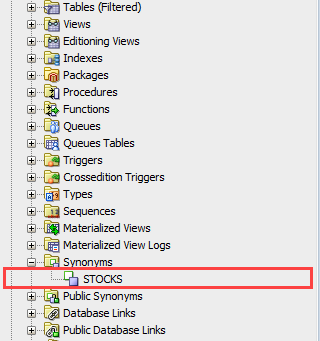
If you use SQL Developer, you can view the newly created synonym in under the Synonym nodes as shown in the following picture:

oracle create synonym example

Now, you can use the stocks synonym instead of the inventories table in the query like the following:

SELECT * FROM stocks;
Code language: SQL (Structured Query Language) (sql)

Advantages of Oracle synonyms

First, synonyms allow you to change complicated and lengthy names by simplified aliases. It is very helpful if you work with the legacy systems. So instead of referring a table like human_resources.employee_locations, you can use offices.

Second, synonyms can help backward compatibility for the legacy applications. For example, you rename a table but do not want to affect the current applications that currently use the table. To keep the applications working properly, you can create a synonym that has the name the same as the old name of the table.

Third, synonyms help moving objects between schemas, even databases, without breaking the existing code.

In this tutorial, you have learned how to use the Oracle CREATE SYNONYM statement to create an alternative name for a database object.

What is Oracle Synonym?

 This section introduces you to Oracle synonyms that help you create aliases for schema objects such as tables, views, materialized views, sequences, procedures, and stored functions.

Synonyms provide a level of security by hiding the name and owner of a schema object such as a table or a view. On top of that, they provide location transparency for remote objects of a distributed database.

Synonyms create a level of abstraction of the underlying schema objects so that you can rename and move of the underlying objects without affecting the applications based on the synonyms. Note that synonyms themselves are not secured. When you grant object privileges on a synonym, you are granting privileges on the underlying object, and the synonym only acts as an alias in the GRANT statement.

Synonyms can be public or private. A public synonym is accessible to every user in a database and owned by a specified group named PUBLIC while a private synonym is stored in a specific schema owned by a specific user and available only to that user.

  • Create synonym – show you how to create a new synonym for a table.
  • Drop a synonym – describe how to drop a synonym from the database.

In a distributed database system, synonyms help simplify SQL statements.

Suppose you have a table called sales in the schema owned by the user, and you are granted the SELECT privilege for the sales table to PUBLIC.

To query data from the sales table, you use the following statement:

SELECT * FROM lion.sales;
Code language: SQL (Structured Query Language) (sql)

Notice that you must include the name of the schema and the table name to in the query.

To simplify this query, you can create a public synonym using the following CREATE PUBLIC SYNONYM statement:

CREATE PUBLIC SYNONYM sales FOR lion.sales;
Code language: CSS (css)

Now, you can query the table sales with a simpler SQL statement:

SELECT * FROM sales;

Notice that the sales public synonym hides the name of the sales table and its schema lion.

Tuesday, November 2, 2021

What is Oracle Function-based Index?

Summary: in this tutorial, you will learn how to use the Oracle function-based index to speed up queries that consist of functions.

Introduction to Oracle function-based index

We will use the members table created in the CREATE INDEX tutorial for the demonstration.

The following statement creates an index on the last_name column of the members table:

CREATE INDEX members_last_name_i ON members(last_name);
Code language: SQL (Structured Query Language) (sql)

If you use the last name column in the WHERE clause, the query optimizer will definitely use the index:

SELECT * FROM members WHERE last_name = 'Sans';
Code language: SQL (Structured Query Language) (sql)

However, if you use a function on the indexed column last_name as follows:

SELECT * FROM members WHERE UPPER(last_name) = 'SANS';
Code language: SQL (Structured Query Language) (sql)

the query optimizer could not leverage the index.

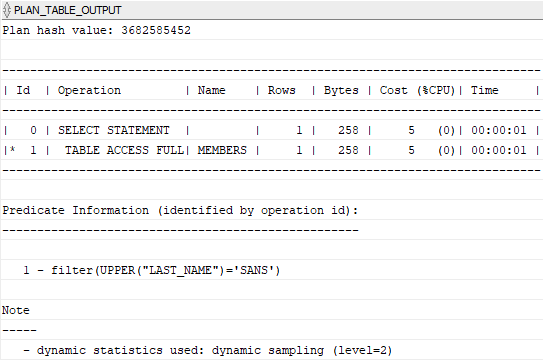
The following statements show the execution plan of the query above:

EXPLAIN PLAN FOR SELECT * FROM members WHERE UPPER(last_name) = 'SANS'; SELECT PLAN_TABLE_OUTPUT FROM TABLE(DBMS_XPLAN.DISPLAY());
Code language: SQL (Structured Query Language) (sql)

Here is the execution plan:

Oracle Function-based Index - Table Access Full

To encounter this, Oracle introduced function-based indexes.

A function-based index calculates the result of a function that involves one or more columns and stores that result in the index.

The following shows the syntax of creating a function-based index:

CREATE INDEX index_name ON table_name (expression)
Code language: SQL (Structured Query Language) (sql)

In this syntax, the index expression can be an arithmetic expression or an expression that contains a function such as a SQL function, PL/SQL function, and package function.

Note that a function-based index can be a btree or bitmap index.

Oracle function-based index example

The following statement creates a function-based index based on the UPPER function:

CREATE INDEX members_last_name_fi ON members(UPPER(last_name));
Code language: SQL (Structured Query Language) (sql)

In this example, Oracle converted all values in the last_name column to uppercase and stored these results in the members_last_name_fi index.

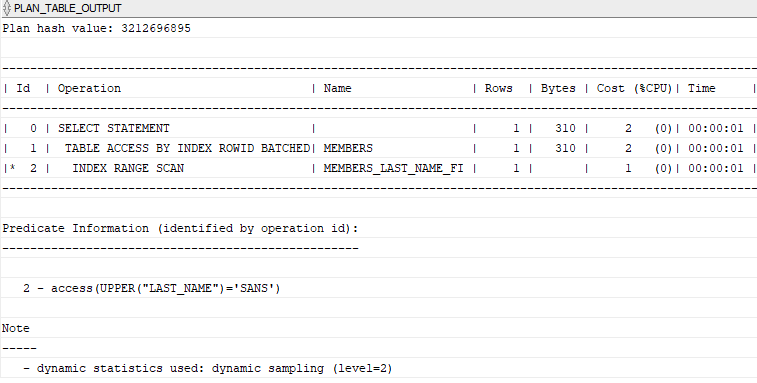
Now, if you find members by the last name, the query optimizer will consider the index as shown in the following query plan:

EXPLAIN PLAN FOR SELECT * FROM members WHERE UPPER(last_name) = 'SANS'; SELECT PLAN_TABLE_OUTPUT FROM TABLE(DBMS_XPLAN.DISPLAY());
Code language: SQL (Structured Query Language) (sql)

The following picture shows the execution plan:

Oracle Function-based Index - Index Range Scan

Advantages of function-based indexes

A function-based index has the following main advantages:

  • A function-based index speeds up the query by giving the optimizer more chance to perform an index range scan instead of full index scan. Note that an index range scan has a fast response time when the WHERE clause returns fewer than 15% of the rows of a large table.
  • A function-based index reduces computation for the database. If you have a query that consists of expression and use this query many times, the database has to calculate the expression each time you execute the query. To avoid these computations, you can create a function-based index that has the exact expression.
  • A function-based index helps you perform more flexible sorts. For example, the index expression can call  UPPER() and LOWER() functions for case-insensitive sorts or NLSSORT() function for linguistic-based sorts.

Disadvantages of function-based indexes

The following are major disadvantages of function-based indexes:

  • The database has to compute the result of the index in every data modification which imposes a performance penalty for every write.
  • The function invoked involve in the index expression must be deterministic. It means that for the same input, the function always returns the same result.
  • The query optimizer can use a function-based index for cost-based optimization, not for rule-based optimization. Therefore, it does not use a function-based index until you analyze the index itself by invoking either DBMS_STATS.GATHER_TABLE_STATS or DBMS_STATS.GATHER_SCHEMA_STATS.

In this tutorial, you have learned how to use the Oracle function-based index to speed up queries that involve functions.

How to DROP SEQUENCE in Oracle?

  Oracle  DROP SEQUENCE   overview The  DROP SEQUENCE  the statement allows you to remove a sequence from the database. Here is the basic sy...